
Prepear Meal Planner & Recipes
PrepearFood & Drink
3.8324.00 Reviews
- Version
- 26.4.11
- Installs
- 100.00K
- Age Rating
- Teen
Screenshots
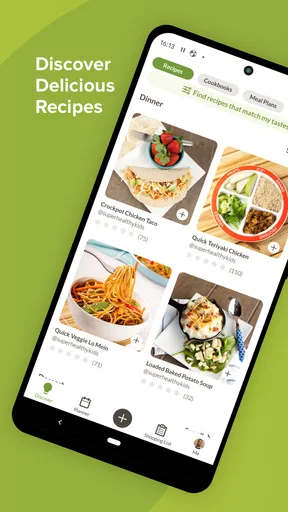
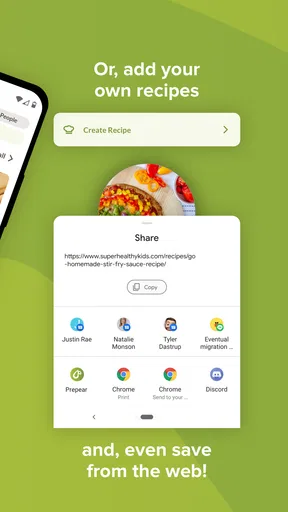
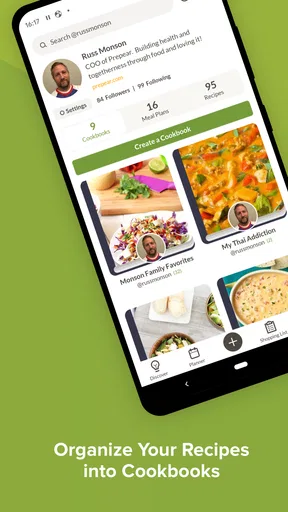
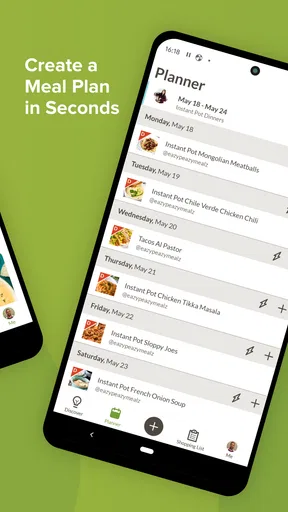

Our Review of Prepear Meal Planner & Recipes
 Analysis by Appyee
Meal planning usually fails for a simple reason: the plan looks good on Sunday, then becomes awkward when real life gets in the way. I found Prepear most useful when I treated it less like a recipe box and more like a practical bridge between choosing meals, buying ingredients, and getting dinner started. It brings those jobs together in one Food & Drink app, and that combination is the main reason I would recommend trying it.
Prepear is free to download, with optional in-app purchases ranging from $0.99 to $119.99 per item. It is made by Prepear and carries a Teen content rating. The app has reached over 100 thousand installs and holds an average rating of 3.8 from around 1.1 thousand ratings, so the overall response is positive but not universally enthusiastic. After using it, that middle-ground reputation makes sense: the core idea is genuinely helpful, while the experience depends heavily on whether you enjoy organizing meals digitally.
How Prepear turns recipes into a workable weekly plan
The strongest part of the app is the connection between recipes and planning. In many recipe apps, I can save attractive dishes but still have to remember what I need, decide when to cook each one, and build a shopping list somewhere else. Prepear is designed to reduce that mental juggling. I can begin with a recipe, think about the week ahead, and use the planned meals as the basis for grocery preparation rather than starting with a blank list.
That matters because meal planning is not only about discovering food. It is also about making a decision once instead of making the same decision every evening. When I plan several meals together, I can notice repeated ingredients, avoid buying random items that do not fit together, and choose recipes that match the time I actually have. The app’s value appears in that sequence, not in any one recipe screen.
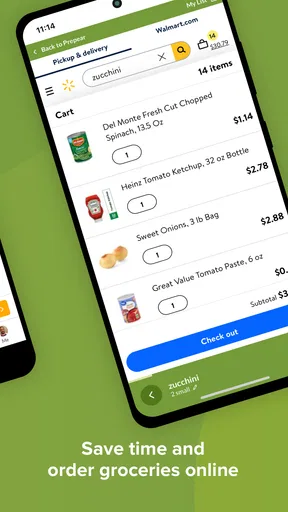
I would not describe it as a replacement for a full grocery-delivery service or a specialist nutrition tracker. Its focus is narrower and more useful: helping me organize recipes, meals, and shopping preparation. If I already have a preferred supermarket app, I can still use Prepear for the planning stage and then transfer the final list manually. That extra step is not ideal, but the planning structure can still save time.
A realistic weeknight example
Imagine I get home late on Tuesday and have only a short window before dinner. Without a plan, I might open the refrigerator, find partial ingredients, and either improvise badly or order food. With Prepear, I can look at the meal I assigned to that evening and see the recipe I selected earlier. If I prepared the grocery list properly, the important ingredients should already be in the kitchen, which changes the experience from “What can I make?” to “How do I start?”
The same approach works for a busy household. I can plan a quicker meal for a work night, reserve a more involved recipe for the weekend, and use the grocery list to check whether both meals share ingredients. That is a small but meaningful improvement. It turns meal planning into a set of linked decisions instead of an isolated search for something that looks appetizing.
One useful habit is to plan around ingredients before planning around individual recipes. If I know I want to use a particular vegetable, grain, or protein during the week, I can choose recipes that make the purchase worthwhile. This helps reduce the “one recipe, one unusual ingredient” problem that often makes cooking at home feel expensive or wasteful. Prepear does not remove the need for judgment, but it gives that judgment a more organized place to happen.
Why the grocery-list connection is more important than it sounds
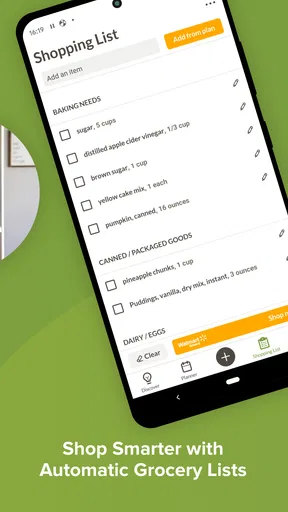
A recipe collection can become another form of clutter if saved dishes never influence what I buy. The grocery-list side gives the app a practical purpose. I found it more useful to create a short plan first and then build the shopping list from that plan than to browse endlessly and save everything that looked good.
There is also a trade-off here. A generated list is only as reliable as the recipes and quantities I choose. I still need to check pantry staples, serving needs, substitutions, and items I already own. I would not blindly shop from any automated list, including this one. My best workflow was to review the list before leaving home, remove duplicates, and group the items mentally by the layout of my usual store.
That final review is not wasted effort. It is where I adapt the plan to real life. If fresh produce looks poor, an ingredient is unavailable, or I remember that one family member dislikes a particular food, I can change the meal before spending money. The app helps me prepare; it does not make the decisions for me.
Recipe discovery without losing control
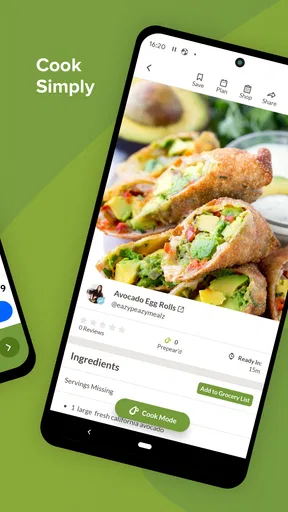
Prepear works well for people who like inspiration but do not want inspiration to take over the week. I can browse recipes, select dishes that fit my schedule, and turn those choices into a more deliberate plan. The advantage is not simply having more meals to look at. It is being able to move from “That looks good” to “That fits on Thursday and uses what I will buy.”
I recommend resisting the temptation to create an ambitious plan every time. A plan filled with complicated recipes can become discouraging, especially after a long day. I prefer mixing dependable meals with one or two dishes that require more attention. That approach makes the app feel supportive rather than demanding, and it gives me a fallback when the week becomes unpredictable.
Another practical tip is to leave some flexibility. Planning every meal too rigidly can make leftovers difficult to use and can turn an unexpected invitation into a problem. I get more value when the plan acts as a menu of prepared options rather than a strict contract. This is one of the less obvious strengths of a digital planner: I can adjust the order of meals without throwing away the whole week.
The friction points that affect everyday use
The biggest limitation is that organization takes effort before it saves effort. I have to choose meals, inspect the resulting list, account for what is already at home, and keep the plan current. Someone looking for a completely automatic “tell me what to eat” service may find the process more involved than expected. Prepear is a planning tool, not a personal assistant that understands every household habit without input.
That trade-off also affects spontaneity. If I enjoy deciding dinner at the last minute, a structured planner may feel like unnecessary administration. The app makes more sense for people who want fewer daily decisions. It is less compelling for someone who cooks almost entirely from memory, shops without a list, or prefers to choose meals in the supermarket.
The recipe-to-shopping workflow can also require careful checking. Ingredients may be listed in forms that do not perfectly match how I shop, and a recipe may assume that I understand basic kitchen substitutions. I would still read the recipe fully before buying everything, especially when cooking for guests or working around dietary restrictions. The convenience is real, but it should not be mistaken for a guarantee that every list will suit every household.
The optional purchases are another consideration. The app is free to start, which makes it easy to test the basic experience, but the presence of in-app purchases means some users may encounter features or content that are not part of the free experience. I would recommend exploring the free workflow first and deciding whether the additional value is clear before spending money. The wide purchase range makes it especially important to understand what any individual option includes.
Its 3.8 average suggests a useful app with room for improvement rather than a flawless one. I think that is a fair reading. A meal planner has to fit personal routines, shopping habits, cooking confidence, and household preferences. Even a well-designed workflow can feel awkward if it does not match the way someone already thinks about food.
Who will get the most from it
I see the best fit in people who cook at home regularly but lose time deciding what to make. It should appeal to a new cook who wants recipes connected to a plan, a parent trying to coordinate several meals, or a busy professional who wants to shop once and reduce weekday guesswork. It can also help someone who owns many recipes but rarely turns them into an actual schedule.
It is particularly useful for a household where one person usually carries the mental load of meals. Putting recipes and shopping preparation in one place can make the plan easier to review and adjust. Even when another person does the cooking, a visible weekly structure can make it clearer what needs to be bought and what is intended for each day.
I would be more cautious recommending it to people with highly specialized dietary requirements unless they are prepared to inspect every recipe and ingredient themselves. I would also point frequent improvisers toward a simpler recipe-saving app or a plain notes list. If the only goal is storing favorite recipes, Prepear may feel like more structure than necessary. Its main advantage appears when planning and shopping are both part of the problem.
How it compares with familiar alternatives
Compared with a basic notes app, Prepear offers a more food-specific workflow. Notes are flexible and fast, but they leave me to connect recipes, dates, and ingredients manually. That can be perfectly adequate for a simple household, yet it becomes messy when the list changes during the week. Prepear earns its place by giving meal planning a dedicated structure.
Compared with a standalone recipe app, it is more useful after discovery. A recipe app may be better for browsing, collecting, or reading cooking instructions, while Prepear is stronger when I want those choices to influence the week’s meals and shopping. The choice depends on where my difficulty lies: finding ideas or turning ideas into action.
Compared with a paper planner, the app is easier to revise. I can change the order of meals without crossing out a whole page, and the digital connection to the grocery list is more convenient than rewriting ingredients. Paper still has advantages, though. It is visible on the kitchen counter, requires no screen, and can feel faster for people who already have a reliable manual system. Prepear is not automatically better; it is better when its connected workflow offsets the extra setup.
What I would do before committing to it
I would start with a single week rather than trying to organize an entire recipe collection. I would select a few meals with different difficulty levels, build the grocery list, and then check how much editing is needed. That test reveals more than browsing the recipe catalog because it shows whether the app matches my actual shopping habits.
I would also decide in advance how much planning I want. Some users will benefit from a complete weekly schedule, while others will prefer a small group of options and a flexible order. The second approach is easier to maintain and may prevent the common mistake of abandoning a planner after one overambitious week.
Finally, I would keep a personal substitution rule. If an ingredient is hard to find or likely to be wasted, I would replace it with something I already use confidently. This keeps the app’s plan grounded in my kitchen rather than forcing my kitchen to follow an idealized recipe list.
Prepear runs on devices using at least Android 9, and the current version is 26.4.11. Those details matter if I am installing it on an older phone or tablet. The app is clearly intended for regular, ongoing use rather than a one-time recipe search, so I would also make sure the device is comfortable to use while shopping and cooking.
My final view is favorable, with a clear condition: Prepear is worth trying if your real problem is the gap between choosing recipes and buying the right food. It gives that gap a practical workflow and can make ordinary weeknight cooking feel less improvised. I would not choose it for purely spontaneous cooking, a simple recipe archive, or a completely hands-off meal service.
For me, the app succeeds because it connects three decisions that are usually scattered: what I want to cook, when I want to cook it, and what I need to purchase. Its weaknesses come from the same source: making those connections useful requires setup and review. If I am willing to spend a little time planning, the payoff is fewer last-minute decisions and a more coherent grocery trip. If I am not, a simpler tool will probably feel better.
Prepear has been available since October 18, 2017, and its continued presence alongside a free entry point makes it easy to evaluate without immediately committing to a purchase. I would start with the free experience, use it for one realistic week, and judge it by the result in my kitchen rather than by the number of recipes I can browse. For the right user, that is where this app becomes genuinely useful.
Verdict
Strengths of Prepear Meal Planner & Recipes
- Personalized meal plans make weekly cooking easier.
- Large recipe library suits different tastes and dietary needs.
- Grocery lists help organize shopping and reduce forgotten ingredients.
- Recipes include clear steps and useful serving information.
- Meal planning can help reduce food waste and last-minute takeout.
Limitations of Prepear Meal Planner & Recipes
- Many useful features require a paid subscription.
- Some recipes may use specialty or hard-to-find ingredients.
- The app can feel overwhelming when first setting up preferences.
- Grocery list organization may require extra manual editing.
- Recipe quality and nutrition details can vary between entries.
Similar Picks in This Category
View All
Rappi: Food Delivery, Grocery
Rappi, Inc - Delivery3.5

McDonald’s: Cupons e Delivery
Arcos Dorados4.3

Swiggy: Food Instamart Dineout
Swiggy4.7

Blinkit: Groceries & more
Blinkit4.8

foodpanda: food & groceries
Foodpanda GmbH a subsidiary of Delivery Hero SE4.0

Zomato: Food Delivery & Dining
Zomato4.7
Frequently Asked Questions
What is Prepear Meal Planner & Recipes, and how does it work?
Prepear is a meal-planning and recipe app designed to help you organize what you will cook throughout the week. After creating an account, you can browse recipes, save favorites, build a meal calendar, and generate shopping lists from selected meals. Its main value is combining recipe discovery with planning tools, so you can reduce last-minute decisions and keep ingredients organized.
Does Prepear include recipes for different diets and dietary preferences?
Prepear offers a broad selection of recipes covering different cuisines, cooking styles, and dietary preferences. Depending on the available recipe filters and the individual recipe details, you may find options for vegetarian, vegan, gluten-free, low-carbohydrate, family-friendly, or other eating patterns. However, users with allergies or strict medical diets should always read every ingredient and verify substitutions independently.
Can Prepear create a grocery list automatically?
Yes, one of Prepear’s most useful features is the ability to create a shopping list from the meals and recipes you select. Ingredients can be gathered into one organized list, which helps you prepare for a weekly grocery trip and avoid forgetting important items. You should still review quantities, pantry staples, serving sizes, and duplicate ingredients before shopping.
Is Prepear free to download, or does it require a subscription?
Prepear can generally be downloaded and used with free features, but some content or advanced tools may be available only through a paid membership or in-app purchase. The exact benefits, pricing, trial terms, and renewal conditions can change over time and may differ by platform or region. Check the current listing and subscription screen before confirming payment.
Is Prepear suitable for families and shared meal planning?
Prepear can be useful for families because it helps organize several meals in advance, adjust recipes for different serving sizes, and prepare a consolidated grocery list. It is especially helpful when multiple people need to coordinate dinners or packed meals. Nevertheless, you may need to manually adapt recipes for children, allergies, picky eaters, or ingredients unavailable in your local stores.
